NiftyImages + HubSpot Integration Guide
Overview
Once connected, teams can:
- Sync existing HubSpot personalization tokens directly into NiftyImages
- Build dynamic content using real subscriber data
- One-click publish finished assets into HubSpot Design Manager Custom Modules
- Reuse dynamic content across campaigns, templates, and automated flows
- Avoid manual copy/paste workflows and merge tag errors
Important:
Sending directly to HubSpot requires Marketing Hub Professional or higher.
Free and Starter Portals can still use the merge-tag picker functionality.
Main Features
1. Contact Variable Sync
Use your existing HubSpot contact properties directly inside NiftyImages without recreating or manually remapping customer data.
What this accomplishes
After connecting HubSpot:
- Existing HubSpot personalization tokens automatically appear inside the NiftyImages editor
- Teams can personalize:
- Images
- Countdown timers
- Maps
- Calendars
- Scratch-offs
- Dynamic text
- Loyalty progress bars
- Charts & graphs
- And more
Benefits
- No manual merge tag typing
- Reduce personalization errors
- Use the exact fields already configured in HubSpot
- Faster campaign production
- Easier collaboration across teams
2. HubSpot Custom Module Sync
One-click publish assets directly into HubSpot as reusable Design Manager Custom Modules.
What this accomplishes
Once a NiftyImage is complete:
- Push it directly into HubSpot
- Reuse it across:
- Marketing emails
- Email templates
- Campaigns
- Shared brand assets
Benefits
- No manual HTML copy/paste
- Centralized content management
- Faster deployment across campaigns
- Easier updates and version control
- Ideal for agencies and multi-brand teams
Setup Instructions
Step 1 — Open Integrations
Inside NiftyImages:
- Navigate to Integrations
- Locate the HubSpot integration
- Click Manage Connections
The integration screen explains the available features and connected accounts.
Step 2 — Connect Your HubSpot Account
Click:
+ Connect another account
You will be redirected to HubSpot OAuth authorization.
During authorization, NiftyImages requests access to:
- Contact properties
- Account information
- Design Manager content
NiftyImages stores encrypted OAuth tokens securely and never requires your HubSpot password.
Step 3 — Approve Access
Authorize the requested permissions inside HubSpot.
Once complete:
- Your HubSpot account will appear under Connected HubSpot accounts
- Status will display as:
- Active
- Connected
You can connect multiple HubSpot accounts if needed.
Using Contact Property Sync
Step 1 — Create or Edit an Image inside NiftyImages
Create a Personalized Image.
Step 2 — Access HubSpot Properties
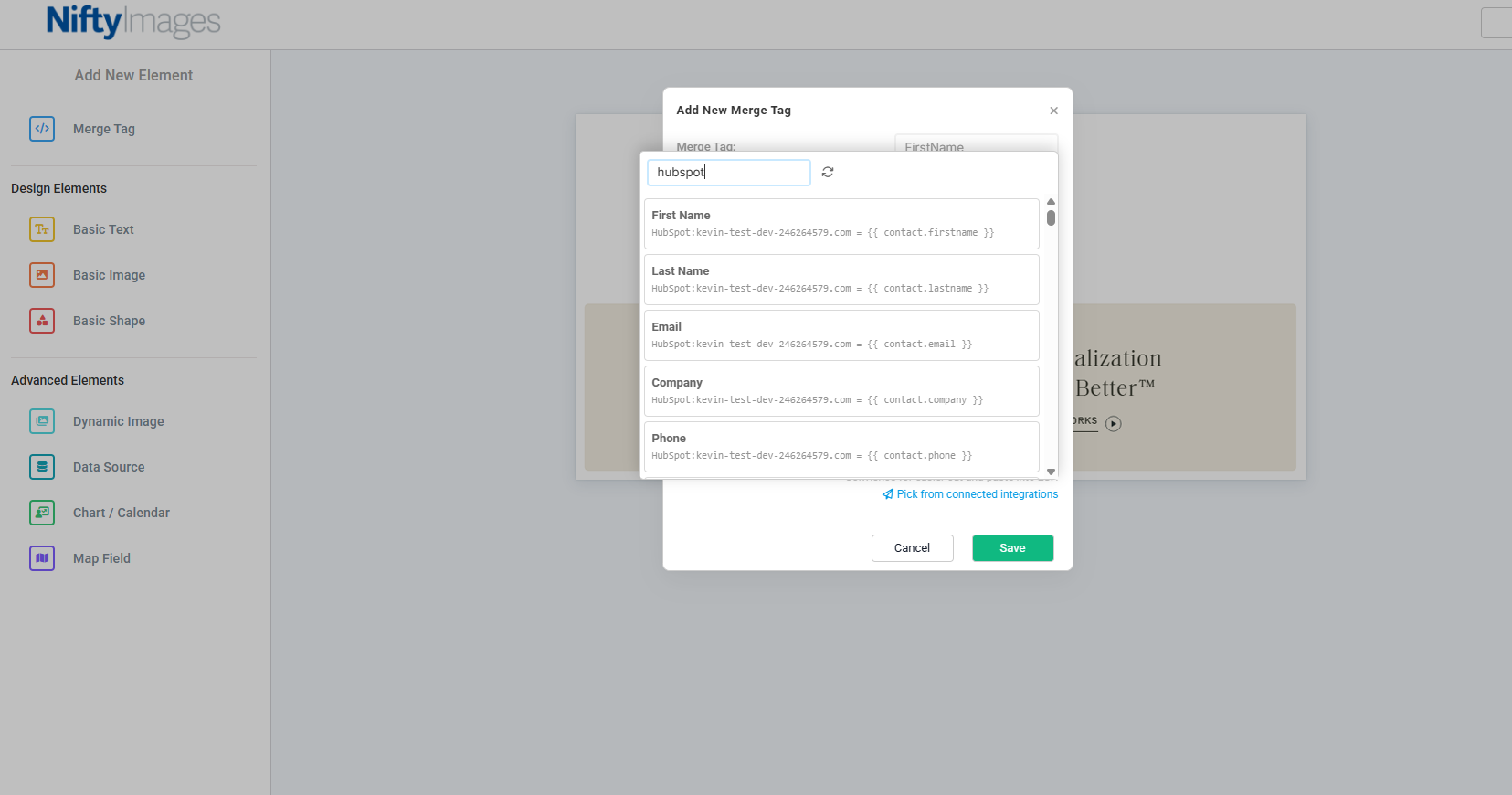
When editing or adding merge tags:
- Your HubSpot personalization tokens automatically appear in the picker
- Select variables directly from the interface
Examples:
- First Name
- Loyalty Points
- Delivery Date
No manual merge tag formatting is required.
Step 3 — Save Your Image
Any saved images using these merge tags will automatically include your HubSpot personalization tokens in the Image URL.
Using HubSpot Custom Module Sync
Step 1 — Finish Your Asset
Complete your NiftyImage design.
Step 2 — Publish to HubSpot
Click the publish option inside NiftyImages.
Select: Send to HubSpot
NiftyImages will automatically create a reusable Custom Module inside HubSpot.
Step 3 — Use Inside HubSpot
Inside HubSpot:
- Open a marketing email
- Add a Custom Module
- Select your synced NiftyImages asset
The content is now reusable across future emails.
Disconnecting an Account
At any time:
- Return to Integrations
- Open the HubSpot connection page
- Click the remove/disconnect icon
Disconnecting:
- Revokes the OAuth token
- Removes NiftyImages access
- Stops synchronization immediately
Security & Data Handling
NiftyImages uses secure OAuth authentication with encrypted token storage.
Security Highlights
- No passwords stored
- Tokens encrypted at rest
- Limited permission scopes requested
- Tokens revoked immediately upon disconnect
- No manual API key management required
Best Practices
Recommended Workflow
- Connect HubSpot
- Create reusable branded assets in NiftyImages
- Use synced personalization properties
- Publish to HubSpot Custom Modules
- Reuse assets across campaigns and templates